Non-Web Services: Outside the Web
What Happens Outside the Browser?

Introduction
The internet is not just a collection of web pages and web browsers; it is a global network interconnecting millions of computing devices. Some of these devices are traditional, like desktops and laptops, while others are not, like mobile phones, IoT devices, and servers. The internet also serves as an infrastructure offering services —functionalities that enable systems— applications and users to communicate and achieve their goals.
But not all of these services involve the web as we know it. Many are non-web services operating on protocols and architectures that most likely, do not rely on HTTP (HyperText Transfer Protocol) but are still involved in shaping our everyday online experiences. We will explore the structural layers that make computer interactions possible, the architectures that support them, and how they intersect with the web.
Internet Protocol Layers: Where Services Begin
For a visual representation of the Internet Protocol Stack, you can check out this diagram from Wei-Sun’s research on Automated Testing of Network Protocols.

Protocols are communication standards that define how data transfer occurs between systems. At the core of the Internet is the Internet Protocol Stack, designed to organize communication into layers.
1. Application Layer: The Application layer is the highest-level protocol layer which is responsible for handling communication between end-user systems. These protocols include HTTP, FTP (File Transfer Protocol), and SMTP (Simple Mail Transfer Protocol).
2. Transport Layer: Responsible for the data transfer between systems using protocols like TCP (Transmission Control Protocol) and UDP (User Datagram Protocol).
3. Network Layer: This handles the routing and transfer of data packets, its protocols implement the techniques for effective data transmission and is responsible for addressing as each device on a networks needs to be identified uniquely. Some examples include, the popular IPv4 and IPv8 as well as ARP (Address Resolution Protocol) and RARP (Reverse Resolution Protocol).
4. Link Layer: Manages communication over specific physical links, like Ethernet or Wi-Fi.
5. Physical Layer: Transmits raw bits across network cables or wireless signals.
Each layer provides services to the one above it. FTPs and HTTPs popularly rely on transport and network layers to enable reliable data transfer.
Architectures: How Systems Communicate
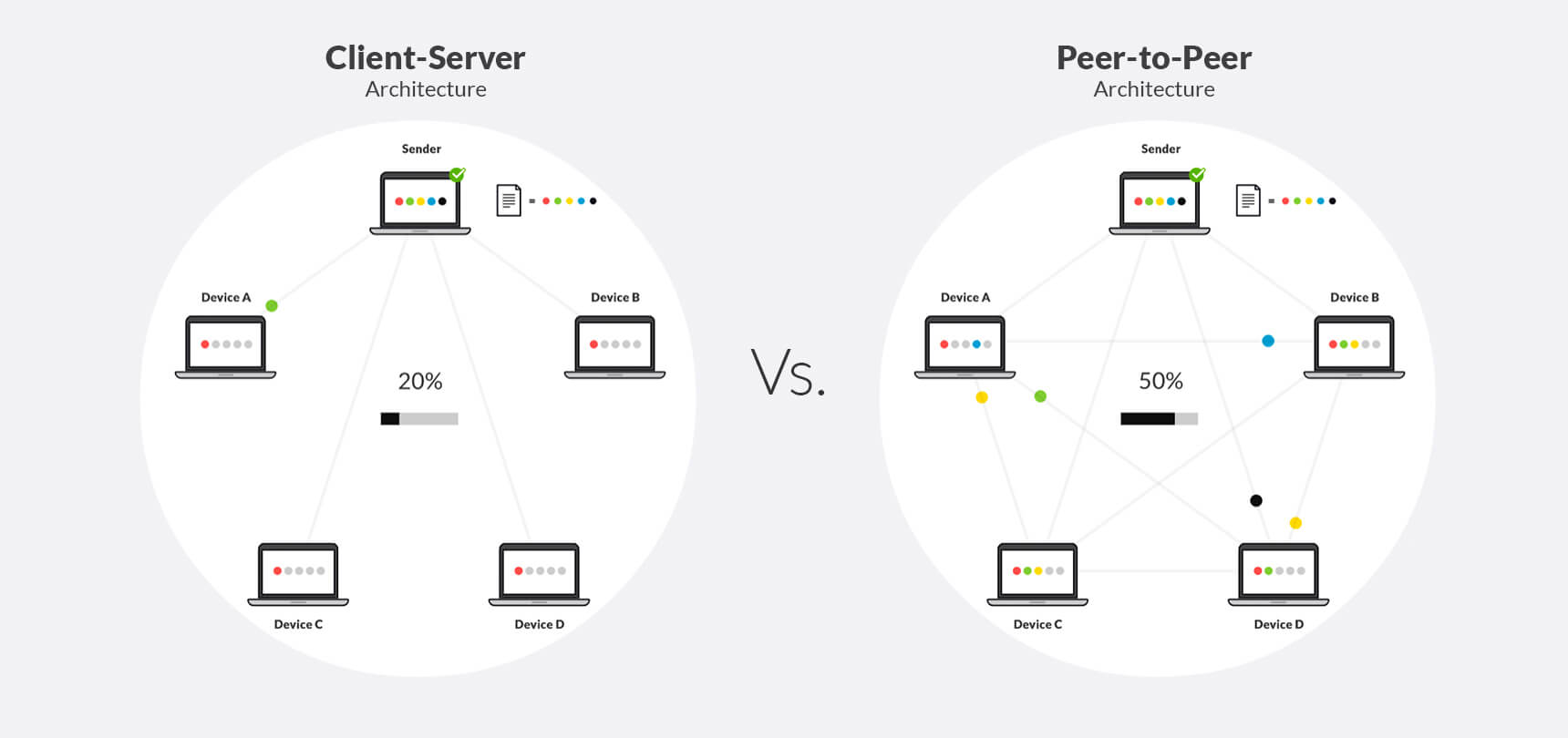
To build applications, we need programs that run on computing devices to communicate with each other over a network. There are two main architectural paradigms for structuring these communications:
For a visual representation of the client-server and peer-to-peer internet architectures, check out this diagram from resilio.com comparing both architectural paradigms.
1. Client-Server Architecture
In this model, one host (the server) provides services to multiple clients. Think of a web browser requesting a webpage from a server. Here’s a practical example:
Use Case: An FTP client interacts with a server to upload website files. A web designer creates HTML and CSS files locally, then uses FTP to transfer these files to the hosting server. The server, in turn, makes these files available over HTTP for visitors to view on the web.
Challenge: As the number of clients grows, a single server can become overwhelmed. To handle this, data centers — clusters of servers — are used, though they come with high costs and infrastructure complexity.
2. Peer-to-Peer (P2P) Architecture
In this decentralized model, devices (peers) communicate directly without relying on centralized servers. A classic example is BitTorrent:
Use Case: A software company might distribute a large operating system update via BitTorrent to reduce server load. Peers downloading the update also upload it to others, creating a scalable distribution network.
While P2P is cost-effective and scalable, it faces challenges like security vulnerabilities and coordination complexities.
Transport Protocols: The Gateway Between Worlds
The transport layer ensures reliable data transmission by establishing connections between processes using protocols like TCP and UDP:
TCP: Although extremely reliable data transfer, as data losses may occur causing the TCP to resend data packets, it is slower because of this advantage. It is ideal for file transfers, messaging systems and email.
TCP Server
import socket

# Create a TCP socket
server_socket = socket.socket(socket.AF_INET, socket.SOCK_STREAM)

# Bind to an address and port
server_socket.bind(('127.0.0.1', 12345))

# Listen for incoming connections
server_socket.listen(1)
print("TCP Server is waiting for connections...")

# Accept connection
connection, address = server_socket.accept()
print(f"Connected by {address}")

# Receive data
data = connection.recv(1024)
print(f"Received: {data.decode()}")

# Send response
connection.sendall(b"Hello from TCP server!")

# Close connection
connection.close()
server_socket.close()
TCP Client
import socket

# Create a TCP socket
client_socket = socket.socket(socket.AF_INET, socket.SOCK_STREAM)

# Connect to the server
client_socket.connect(('127.0.0.1', 12345))

# Send data
client_socket.sendall(b"Hello, server!")

# Receive response
data = client_socket.recv(1024)
print(f"Received: {data.decode()}")

# Close connection
client_socket.close()
UDP:
UDP Server
import socket

# Create a UDP socket
server_socket = socket.socket(socket.AF_INET, socket.SOCK_DGRAM)

# Bind to an address and port
server_socket.bind(('127.0.0.1', 12345))
print("UDP Server is listening...")

# Receive data
data, address = server_socket.recvfrom(1024)
print(f"Received from {address}: {data.decode()}")

# Send response
server_socket.sendto(b"Hello from UDP server!", address)
UDP Client
import socket

# Create a UDP socket
client_socket = socket.socket(socket.AF_INET, socket.SOCK_DGRAM)

server_address = ('127.0.0.1', 12345)  # Match server IP and port

# Send a message to the server
client_socket.sendto(b"Hello, server!", server_address)

# Receive response from the server
data, _ = client_socket.recvfrom(1024)
print(f"Server Response: {data.decode()}")

# Close the socket
(client_socket.close)
Non-Web Services in Action
The core concept of non-web services is its lack of reliance on web protocols like HTTP. It may not always interact directly with browsers, but they often support or enhance web-based workflows. A few examples:
1. FTP and Web Hosting
Scenario: You’re designing a website and need to upload assets (images, scripts, etc.) to a server. While the site is accessed over HTTP, the upload process involves FTP.
from ftplib import FTP  # Import the FTP library

# Step 1: Connect to the FTP server
ftp = FTP('ftp.example.com')  # Replace with your hosting provider's FTP server
ftp.login(user='your_username', passwd='your_password')  # Authenticate here


# Step 2: Change to the public web directory (varies by host)
ftp.cwd('/public_html')  # For most hosting providers, website files go here


# Step 3: Upload multiple files (i.e., HTML, CSS, JS)
files_to_upload = ['index.html', 'styles.css', 'script.js', 'logo.png']
for file_name in files_to_upload:
    with open(file_name, 'rb') as file:
        ftp.storbinary(f'STOR {file_name}', file)  # Upload the file


# Step 4: Verify upload by listing directory contents
ftp.retrlines('LIST')


# Step 5: Close the FTP connection
ftp.quit()
Behind the Scenes: When we upload the files using FTP, our FTP client (our computer) initiates a TCP connection to the FTP server. This server responds by indicating that it’s ready to communicate and requires our username and password for authentication. Once connected, we navigate to the correct folder using
ftp.cwd(‘/public_html’),the server responds with confirmation if the directory exists. We open the file in binary mode and the client splits the file into data packets and sends them via TCP. The server writes these packets into a file on the remote system. Here, we list our uploaded files with this command:ftp.retrlines('LIST'), the connection is then closed once we confirm all files we intended to upload have been uploaded.
FTP operates differently from HTTP in some ways:
Dual Connections: FTP uses two TCP connections; a control connection for user authentication and commands (e.g., login, change directory) and data connection for transferring files.
Out-of-Band Communication: Control information is sent on a separate channel (control connection) from the data being transferred, unlike HTTP, which combines them in a single channel (in-band communication).
Stateful Sessions: FTP servers maintain session information, such as user credentials and current directory state, throughout a session. This stateful nature limits scalability compared to stateless protocols like HTTP.
2. SMTP (Simple Mail Transfer Protocol) and Webmail
Scenario: When you send an email using Gmail or Outlook, it’s not just the web interface at work. Behind the scenes, the email is sent using SMTP.
Behind the Scenes: The web interface communicates with the server to package and send the email. Similarly, IMAP or POP3 protocols might be used to retrieve emails when accessing them offline.
3. VoIP and Web Conferencing
Scenario: During a Zoom call, you’re using a combination of web and non-web services.
Behind the Scenes: The Zoom interface operates over HTTP, but the voice and video streams rely on RTP (Real-time Transport Protocol) over UDP. This hybrid interaction ensures a seamless user experience.
In comparison to other protocols, VoIP leverages the Session Initiation Protocol (SIP) for establishing, modifying, and terminating voice sessions. The actual audio data is transferred using RTP (Real-time Transport Protocol) over UDP to minimize latency. VoIP prioritizes speed over reliability. Data loss is tolerated to maintain call continuity, ensuring minimal delays in conversations.
4. DNS (Domain Name System)
Scenario: When you type a URL into your browser (e.g., https://google.com), your browser needs to figure out which server to connect to. Since computers communicate using IP addresses, not domain names, your browser relies on DNS (Domain Name System) to translate the domain (
google.com) into an IP address. Test the code in your local machine to find out!import socket domain = "google.com" ip_address = socket.gethostbyname(domain) print(f"IP address of {domain} is {ip_address}"
Behind the Scenes: The script sends a DNS query, which is handled by the system’s configured DNS resolver. This resolver may contact other DNS servers to find the IP address of
google.com. Once resolved, the IP is returned and printed. DNS translates human-readable domain names into IP addresses, allowing browsers to locate websites. Most DNS queries use UDP for speed, but TCP is used if the response is too large.
Conclusion
While we often interact with web-based interfaces, many of the most critical functions — like file transfers, voice communication, and email — happen outside the browser. By learning how these services operate and integrate with the web, we can build systems that are not only practical but also scalable and secure.
Understanding when, where and how to implement these protocols, services and architecture is important when dealing with Computer Networking tools.